Sales brochure 1975 · Part 2 · scan pages 2
View source PDF ↗Production Features
Front Panel Edit Control↑ TOP
High on any list of desirable production features is an edit mode. This permits you to spill tape in the area between the capstan and the take-up reel by deactivating the end-of-tape lever and take-up motor. Besides spilling tape, you can also rock the reels back and forth to precisely locate a point on the tape.
Adjustable Cue↑ TOP
Very useful in conjunction with the editing capability is adjustable cue. This allows you to quickly locate portions of a tape by defeating the tape lifters in the head assembly. Tape lifters are put on a machine to lengthen head life by preventing tape contact with the heads during fast forward and rewind. The cue control defeats the tape lifters so that you can hear an audible signal. On the MX-5050, the cue is adjustable, which allows you to reduce the amplitude of the audible signal to prevent overloading monitor amplifiers, speakers, and earphones.
Input Controls↑ TOP
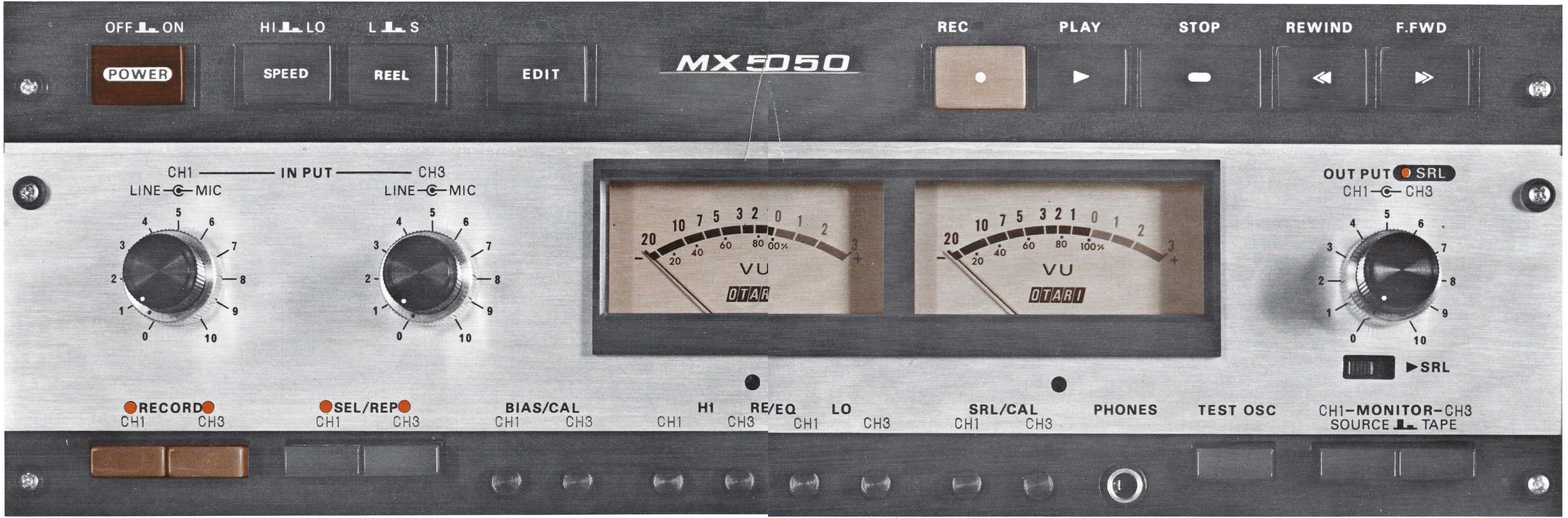
Another convenience feature is that the microphone and line input controls have been combined coaxially for each channel. This makes it simpler to mix inputs from these two sources for a given channel without having to shift your hand quickly to another control.
Operating Controls↑ TOP
All operating controls are grouped logically just above the electronics panel.On the left are Power, High-Low for the two speeds (either 15/7½ ips, or 7½/3¾ ips), Reel Size to provide proper tension for 10½, 7, or 5 inch reels, and the Edit control discussed above. On the right are the tape motion controls for Record, Play, Stop, Rewind, and Fast Forward. All these tape motion controls can be remoted.
In addition to the Record control here, you will note that separate record controls for each channel are located at the bottom left of the electronics panel. This provides a record lock-out or safe position to prevent accidental erasure. To record, you must not only press the Play and Record button simultaneously, but you must consciously select which channel you wish to record on by pressing the Channel one or two record buttons on the electronics panel. As an added benefit, when you are monitoring previously recorded material in the Play mode, the recorder can be put into Record without any clicks or pops by pressing the Play and Record buttons at the same time (this assumes the Record safe push buttons are in the Record position for the track desired). On four-channel machines these record buttons are marked Channels one, two, three, and four.
Selective Reproduce↑ TOP
This important production feature allows a new track to be added to previously recorded tracks in perfect time synchronization. Within the electronics, it temporarily switches the record head for a given channel (or more than one channel on the four track version) to the reproduce electronics so that a performer can listen to previously recorded material on earphones and lay down a new track in time sync. Sound quality in this mode is excellent for this purpose, though not quite as good as in the regular play mode.
Front Adjustable Bias and Equalization↑ TOP
At the bottom of the electronics panel are eight protective screw caps, behind which are located the adjustments for bias, low and high record equalization, and an amplitude adjustment for the standard reference level. The advantage of having these controls on the front panel cannot be overestimated, particularly in today's recording world where readjustment of bias and record equalization is becoming routine to get maximum benefit from the new high energy mastering tapes. Secondary electronics adjustments that seldom need attention, are easily accessible by removing the bottom panel of the case.
Test Oscillator↑ TOP
Built into the MX-5050 is a one kHz test oscillator. This is very convenient for adjusting bias or to provide an audible cue. The test oscillator signal can be switched to appear on the output meters and is adjusted by the front panel line-input level controls.
Standard Reference Level Output↑ TOP
For the many situations where a fixed output of known level is required, the MX-5050 has a front panel switched Standard Reference Level. When in this position, the output is fixed at a +4 dBm level. This level can be adjusted to another amplitude, such as +8 dBm, if desired.
Hysteresis or dc Servo Capstan↑ TOP
The MX-5050 is normally supplied with a hysteresis synchronous motor. An optional dc servo is available for those applications where the power line may be of doubtful accuracy or where you may want to vary the tape speed by use of an external voltage controlled oscillator. Also, in situations where a tape may have been recorded off speed, servo equipped MX-5050s have a front panel pitch control which allows a ±10% correction of the tape speed.
 ⤢ zoomThe full front panel — transport buttons, VU meters and output controls running unbroken across the fold